

Dynamics 365 Returns Management Integration for Finance, Supply Chain and Business Central
Return orders, credit notes, item arrivals and inventory, kept in step between ReverseLogix and Dynamics 365.
It is Thursday close. Finance finds forty returned items with no credit note, and the warehouse says they were received Monday. Someone opens a spreadsheet, then Dynamics 365, then the carrier portal, and starts matching by hand. ReverseLogix connects to Microsoft Dynamics 365 Finance and Supply Chain Management and to Business Central, so the return is authored once and the posting follows. This page explains what syncs, when it syncs, who touches the connection and what the project takes. Dynamics 365 stays your system of record for orders, credit and stock. ReverseLogix runs the return itself: request, receiving, inspection, repair and disposition.
Returns teams using ReverseLogix include:











What Breaks When Returns Live Outside Dynamics 365?
Returns start in a portal, a helpdesk, an email or a carrier scan. Dynamics 365 sees none of it until someone types it in. Every gap between those places becomes a manual step, and every manual step becomes a late credit.
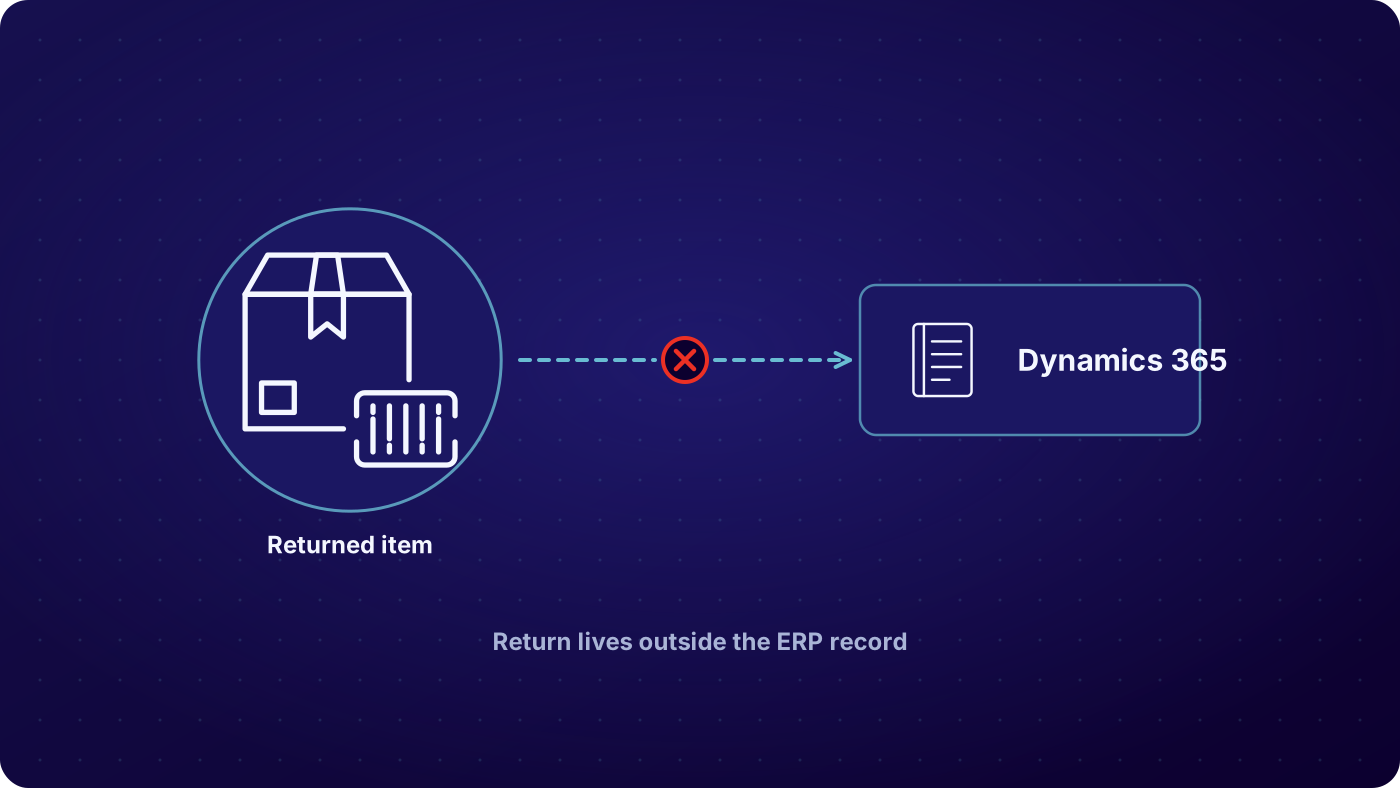

Return orders get keyed by hand
A customer service rep reads a request and creates the return order in Dynamics 365 by hand. It is slow at volume, and one wrong line quantity turns into a wrong credit.

Credit notes lag the warehouse
The dock scans a unit on Monday. Finance raises the credit note on Thursday, once someone matches the two. Customers chase, and the books close with returns nobody has valued.

Stock counts drift
A returned unit sits on a rack with no item arrival posted. Dynamics 365 shows it as gone, or shows it as sellable when it is scrap. Planning works from the wrong number.

Failures nobody sees
A message fails, or posts twice, and nobody knows. The return shows as no order found, or as a duplicate. Without a log, the only way to find out is to ask IT.
What Syncs in the Dynamics 365 Returns Management Integration, and When?
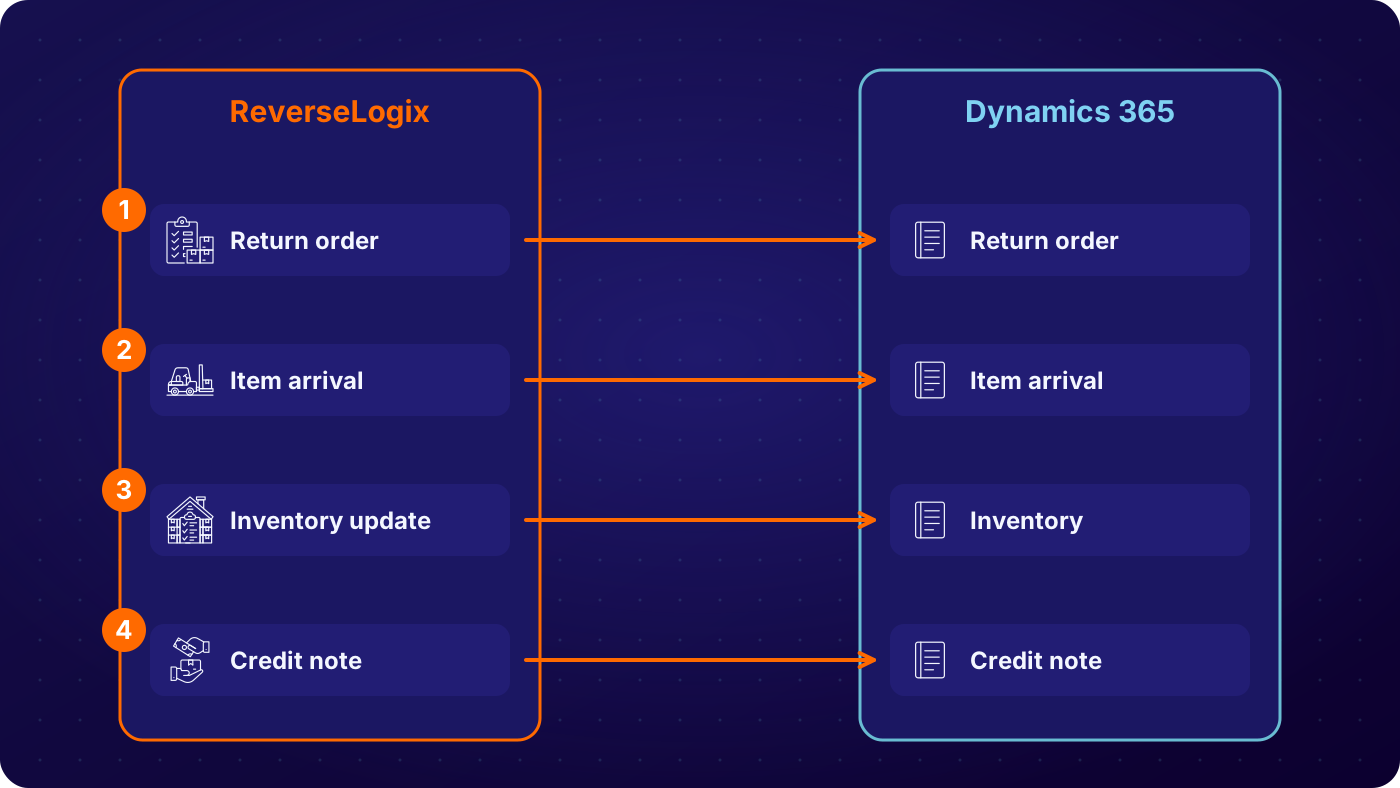
Order and customer data comes in
ReverseLogix reads the sales order, the lines, the customer and the item master from Dynamics 365 through API. The portal, the helpdesk and the service team all work from the same order data. Return windows, warranty entitlement and serial checks run against it at request.
See: returns initiation
The return order is created
When a return is approved, ReverseLogix posts the return order to Dynamics 365 with the reason, the lines and the quantities. Nobody re-keys the request. Field mapping decides which reason codes, return types and dimensions carry across.
See: RMA software
Item arrival and inventory update
When the unit is received and inspected, ReverseLogix posts the item arrival and the outcome: restock, repair, refurbish, return to vendor or scrap. The grade and the destination go to the record, so stock in Dynamics 365 reflects what is on the rack.
See: returns processing

Credit note or refund posts
The credit trigger fires at the point you set, and standard is custody transfer. ReverseLogix sends the credit note details to Dynamics 365, so Finance sees the credit against the right invoice and customer without a manual match.
See: analytics
| Condition at inspection | Typical route | Recorded on the return |
|---|---|---|
| Return approved | Return order posts to Dynamics 365 | Sales order reference, customer, lines, quantities, return reason, RMA number |
| Unit received at the dock | Item arrival posts | Item, serial, quantity, warehouse, receipt timestamp |
| Inspection and grading complete | Disposition and inventory update posts | Grade, disposition, inventory status, location, photos on the ReverseLogix record |
| Refund trigger met | Credit note details post | Credit amount, invoice reference, customer, trigger event, timestamp |
| Message fails or repeats | Held in the message log and retried under your rules | Payload, error, retry count, resolution, user |
Example configuration. Objects, fields and triggers are mapped per project during scoping.
Which Teams Touch the Dynamics 365 RMA Integration?
Four groups work with this connection, and each needs a different view. IT owns credentials, environments and releases. Finance owns credit notes and the close. Operations owns receiving and inventory. Customer service answers the customer. All four see the same return record, so nobody rebuilds it from an email thread. If you run Dynamics 365 for Finance and Supply Chain Management in one region and Business Central in another, both can connect to the same ReverseLogix program.
See: IT teams, finance teams
One connection, four views
- IT: credentials, sandbox, message log, release schedule
- Finance: credit notes matched to the return and the invoice
- Operations: item arrivals, grades and stock status
- Customer service: return status without a call to the warehouse
How Do You See Errors, Retries and Reconciliation?
Every message between ReverseLogix and Dynamics 365 is logged with its payload, its status and its result. A failed post does not disappear. It sits in the log with the error, and it retries under rules IT sets, so a burst of returns does not flood the API. A duplicate is caught before it posts twice. Finance can reconcile returns received, credits posted and stock moved from one list, and each record carries a full audit history.
- Return orders created in ReverseLogix but missing in Dynamics 365
- Units received with no item arrival posted
- Credit notes posted twice, or posted without a received unit
- Failed messages waiting on a retry, with the error shown
- Mapped fields that changed after a Dynamics 365 release
See: analytics
Dynamics 365 Stays the System of Record
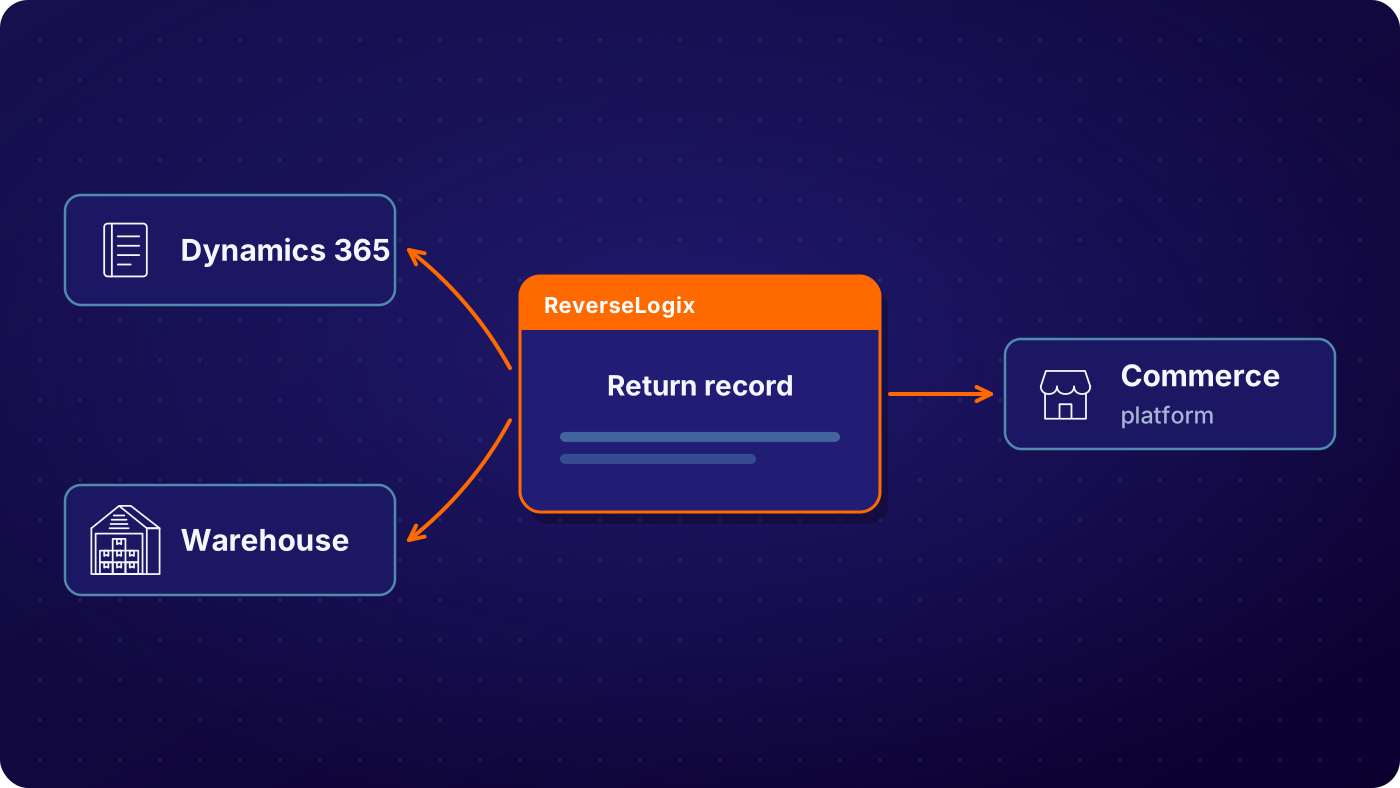
ReverseLogix does not replace Dynamics 365 Finance and Supply Chain Management or Business Central. It holds the returns record and posts to your ERP through API. Orders, invoices, credit and stock stay in Dynamics 365. It also connects to your WMS, your commerce platform and your helpdesk, so one return does not need four separate integrations built around it.
See: all integrations, SAP integration, NetSuite integration
Credentials, Sandbox, UAT and Release Management
Connecting to Dynamics 365 takes a scoped project, not a switch. IT provides an app registration and credentials with the access the integration needs and no more. The team maps fields and reason codes, tests in a sandbox, runs UAT against realistic returns, then agrees a go-live plan. Standard go-live for initiation is 4 to 6 weeks, and repair and technician flows extend it. If your calendar has a code freeze, plan around it from the start.
After go-live, Dynamics 365 releases and ReverseLogix releases each need a check against the mapped fields. Role-based access controls who can change a mapping, and the audit history records who did. ReverseLogix shares its security certifications during evaluation, and your security team can review them before any credential is issued.
See: implementation, security
Your next questions, answered



Dynamics 365 returns management integration: questions and answers
Yes. ReverseLogix integrates with Microsoft Dynamics 365 through API, covering Finance and Supply Chain Management and Business Central. Return orders, item arrivals, inventory status and credit note details move between the two systems. The exact objects and fields are agreed during scoping, because every Dynamics 365 setup carries its own customizations.
ReverseLogix connects to Dynamics 365 Finance and Supply Chain Management and to Business Central. Confirm your version, your customizations and any middleware during scoping. A company with several legal entities or regions can use both products against one ReverseLogix program, with mappings set for each entity.
Yes, once the mapping is configured and tested. ReverseLogix posts the return order when a return is approved and sends credit note details when the refund trigger is met. Standard is custody transfer. Your team can set a different trigger, and each posting is logged with its result.
No. Dynamics 365 stays your system of record for orders, invoices, credit and stock. ReverseLogix runs the return itself, from request through receiving, inspection, repair and disposition, and posts the results to Dynamics 365. Nothing in your ERP needs to be retired to use it.
The failure is logged with the payload and the error, and the message is held for retry under rules your IT team sets. Nothing drops silently. Duplicates are checked before posting. Your team can see what failed, why, and whether it has since posted, without opening a ticket.
Expect IT time for an app registration and credentials, a business owner to confirm field mapping and reason codes, and testers for UAT. ReverseLogix supplies the mapping design, sandbox testing and go-live plan. Standard go-live for initiation is 4 to 6 weeks. Repair and technician flows extend it.
Yes. The integration is built and tested in a sandbox first, then run through UAT with realistic returns before go-live. Sandbox and production can differ, so the plan includes a check that production matches what UAT showed. A go-live date is agreed with your release calendar and any freeze in mind.
Access is role-based, credentials are scoped to what the integration needs, and every change to a mapping is kept in the audit history. ReverseLogix shares its security certifications during evaluation, and your security team can review them before any credential is issued or any test begins.
Further reading: Microsoft Dynamics 365.
See Your Returns Post to Dynamics 365 Without the Re-Keying
A specialist walks through your Dynamics 365 setup, maps the return events to your objects and shows what the project takes, before any demonstration.


